
12 Streams and I/O
[TOC]
12.1 stdin/stdout
12.1.1 input/Output Redirection 输入/出重定向
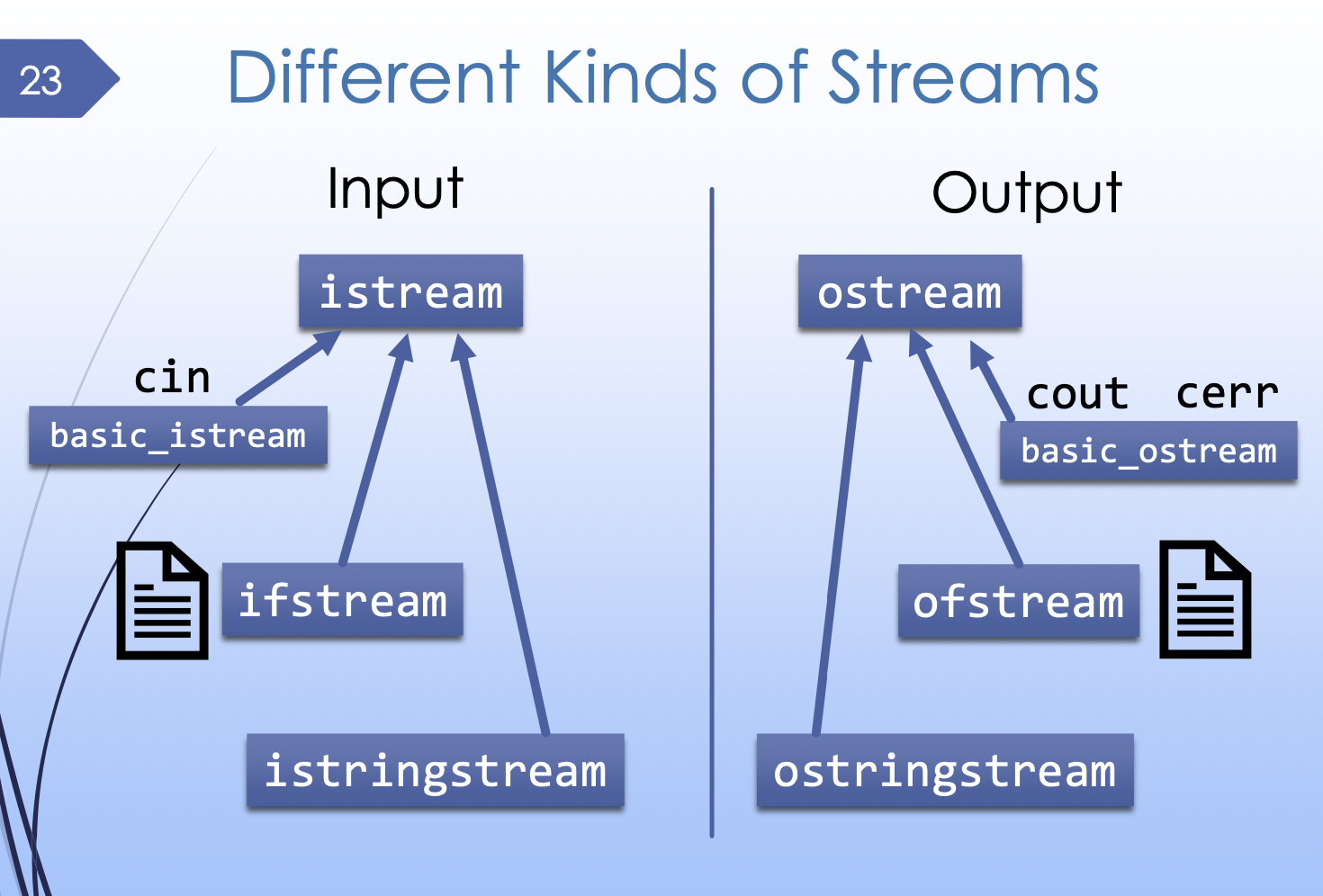
Programs 和 command-line environment 通过这三个 predefined streams 来进行交互:
- standard input(stdin):
cin - standard output(stdout):
cout - standard error output(srderror):
cerr
cin and cout 在默认情况下媒介是 terminal (i.e. from/to the user).
所以其实我么的 cin 和 cout 都是和 terminal 对话.
我们可以在 terminal 中给一个 file 来代替我们键盘的 stdin/cin; 并且也可以给定一个 file,把任何命令的执行结果 (stdout/cout) 输出到 file 里面.
./game.exe < choices.txt
这表示执行 ./game.exe 文件,并把 choices.txt 这个文件的内容作为文件的输入.
ls > ls.txt
这表示把 ls 命令的执行结果输出到 ls.txt 文件里.
in.txt > ./game.exe
这表示把 in.txt 作为 ./game.exe 的输入.
12.1.2 Makefile 通过 redirection 实现 regression test
make test
当我们打出这行指令的时候,我们实际上是指令了 Makefile 文件当中的 test 这部分.
也就是说,我们肯定有一个 Makefile 文件才能执行这个命令. 这个命令会找到 directory 里面的 Makefile,并且在 Makefile 文件里面找到 test 这一块. 也就是说我们肯定定义了一个 test 指令块:
# Project 1 Makefile

# Run a regression test
test: main.exe stats_tests.exe
stats_public_test.exe
	./stats_public_test.exe ./stats_tests.exe
	./main.exe < main_test.in > main_test.out
	diff main_test.out main_test.out.correct
这里当我们执行 make test 时,我们就调用可这一块,相当于使用编译器在 terminal 里面执行了 test: 后面的这些命令. 于是我们就生成了所有这个 project 的exe 文件并运行,然后把结果输出到了一个文件里与我们事先设置好的正确结果进行比较. 这就是一个 regression test.
12.1.3 Pipelines
Pipeline 就是 | 这个 operator. 它可以把一个 program 的 stdout 作为 stdin 输入到另一个 program. **注意:一个command 也是一个 program,所以它当然也可以把一个 command 的 stdout 作为 stdin 给另一个 command. **
./game.exe | grep 'battle' > battles.log
顺序就是把左边 program 的 stdout 作为右边 program 的 stdin. command line 里面的东西都是从左至右自然顺序,除非加上括号.
所以在这里:
./game.exe的 stdout 输入给了grep 'battle'这个 command 作为其 stdin.- 而后把
grep 'battle'这个 command 的 stdout redirect 至battles.log.
注意 grep 这个 command (program) 的用处是检其 stdin 中的所有含有某个关键词的行,并输出. 这里就是检索 ./game.exe 文件中所有包含 "battle" 的行,然后输出 (被redirect 至了 log).
12.2 Exit Codes in C++ Programs
我们的 main() 函数是有一个返回值的. 它默认为0.
当一个 process (运行中的 program) 运行结束时, 它会 passes back an integer “exit status” or “exit code”.
这个 return value 就是 program 的 exit code. 这个 exit code 为一个 9 位的二进制数,因而范围是 0-255.
如果为0 代表没问题,如果不是 0 代表 process 有 error 被打断了. 一般是 1.
1 到 255 表示不同的错误或状态。一些退出代码已经有了约定俗成的含义,例如:
- 1:通常表示通用的未知错误.
- 2:用于命令行语法错误.
- 126:表示命令不可执行.
- 127:表示找不到命令,可能是因为命令的路径问题.
- 128:无效的退出参数.
- 128 + N:表示通过信号 N 终止的进程,例如,退出代码 137 (128 + 9)通常表示进程收到了 SIGKILL 信号.
- 255:通常用于表示退出状态超出范围.
int main() {
  ofstream fout("output.txt");

  if (!fout.is_open()) {
    cout << "open failed" << endl;
    return 1; // ERROR
	}

  // Compiler automatically adds a
  // return 0; at the end of main()
}
我们可以在 terminal 使用 echo $? 来查看前一个 command 的 exit code.
cp file.txt other.txt
echo $?
# 0
# success!
./Image_tests.exe
# Segmentation fault
echo $?
# 139
# error, crash with SIGSEGV (128 + 11)
diff -q test.out test.correct
# Files test.out and test.correct differ
$ echo $?
# 1
# error, files are different
12.3 file I/O with streams: fstream
C++ 中有一个 library 中的 stream objects 可以模拟 stdin/stdout. 它们在 fstream 这个 library 中.(文件流)
fstream 中的 ifstream 这类 object 可以模拟 cin,允许你 read a file just like reading from cin.
另一类 object ofstream 可以模拟 cout,允许你 write to a file just like printing to cout.
引用这个 library:
// ifstream and ofstream live `
// in the fstream library
#include <fstream>
12.3.1 使用 stream 型 objects 打开一个文件
ifstream fin("order.txt");
ofstream fout("output.txt");
这里定义了一个叫 fin 的 ifstream 类 object,一个叫 fout 的 ofstream 类 object.
#include <fstream>

int main() {
	ofstream fout("output.txt");
	if (!fout.is_open()) {
		cout << "open failed" << endl;
		return 1;
	}

	for (int i = 0; i < 1000; ++i) {
		fout << i << endl;
	}

	fout.close();
}
.is_open() 这个函数可以查看文件是否被 stream object 正确打开.
.close() 这个函数可以关闭一个 fstream,这样其他 program 就可以安全地访问它刚才 open 的这个 file.
12.3.1.2 如何追加而非覆盖文件内容
默认情况下,ofstream 会 override 文件的所有内容. 但是我们不希望这样.
我们可以指定 fstream 的多种模式:
std::ios::app: 所有写入操作都追加到文件末尾,文件不会被截断(即不会清空现有内容),即使文件已存在.std::ios::ate:打开文件并直接移动到文件末尾,可以用于在文件末尾之前的任何位置添加内容,而不覆盖现有内容。
ofstream file("example.txt", ios::app);
12.4 Stream Input/Output
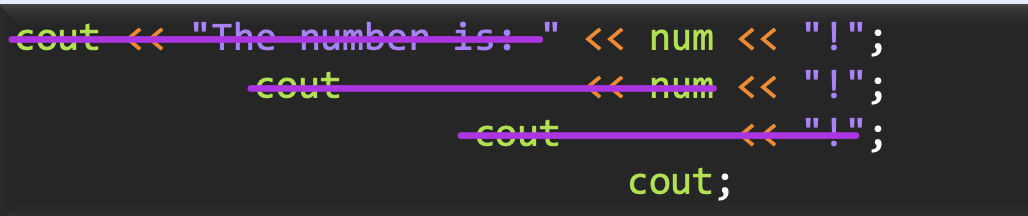
我们知道 << 是 insertion operator,代表 stream output.
>> 是 extraction operator,代表 stream input.
The behavior is specific to the type of object.
这两个 operator 首先 read/write,然后 turns back into the itself.
12.4.1 如果判断 stream operation 是否成功
首先我们知道 >>, << 是 operator,而一个 operator 一定有一个 bool value. 因而它自身的值就代表了它是否成功.
while (fin >> word) { // Read until end of file
  if (word == "bee") {
    cout << "cat" << endl;
  }
	else { cout << word << endl; }
}

while (getline(fin, line)) {	// 也一样
... }
不仅如此,stream objects 自身还可以被 "contextually" 转化为 bool value.
if (fin) {
  cout << "stream is ok!" << endl;
}
值都是表示是否有 read/write operations 失败.
12.4.2 Mixing << and getline()
我们应当在混合使用 >> 和 gitline() 时注意. 以前已经学过:
>> 会留下 newline character,但是下一个 cin 会无视并销毁它.
getline() 并不会. getline() 会读取包括 newline character 在内的内容,即便只有一个 newline character 也算是一行.
ifstream fin("hello.txt");

string word;
fin >> word;
cout << word << endl;

string line;
getline(fin, line);
cout << line << endl;
这里的问题在于:The first fin >> word leaves the newline character in the stream,而 getline() reads a blank line.
Fix: add fin >> ws before any getline following >> input.
12.4.3 function 中的 stream parameters
// REQUIRES: img points to a valid Image
// EFFECTS:  Writes the image to the given output stream
//           in PPM format.
// ...
//           ...
void Image_print(const Image* img, ostream& os);
我们可以 Pass streams by reference 来使用 fucntion 操作 stream. 上面这个 function 可以 write to 任何 output stream,我们知道 ofstream, ostringstream, cout, cerr 都属于 ostream. 它们都支持 >> operator.
12.5 Stringstreams
istringstream 是一种用一个 string 作为 source 的 input stream.
它可以用来 simulating stream input from a "hardcoded" string.
TEST(test_image_basic) {
	// A hardcoded PPM image
	string input = "P3\n2 2\n255\n255 0 0 0 255 0 \n";

  // Use istringstream for simulated input
  istringstream ss_input(input);
  Image *img = new Image;
  Image_init(img, ss_input);

  ASSERT_EQUAL(Image_width(img), 2);
  Pixel red = { 255, 0, 0 };
  ASSERT_TRUE(Pixel_equal(Image_get_pixel(img, 0, 0), red));
  delete img;
}
同样的,ostringstream 是一种可以用 .str() 转成 string 的 stream. 可以用来 check for correctness of output.
TEST(test_matrix_basic) {
	Matrix *mat = new Matrix; Matrix_init(mat, 3, 3);
	Matrix_fill(mat, 0);
	Matrix_fill_border(mat, 1);

  // Hardcoded correct output
  string output_correct = "3 3\n1 1 1 \n1 0 1 \n1 1 1 \n";

  // Capture output in ostringstream
  ostringstream ss_output;
  Matrix_print(mat, ss_output);
  ASSERT_EQUAL(ss_output.str(), output_correct);
  delete mat;
}