5 Version Control
首先安装 git
sudo apt install git
git --version
然后 configure name 和 email
git config --global user.name "Your NAME here"
git config --global user.email "Your Email here"
5.1 Github Authentication 验证
有两个方法 connect to Github:
- SSH Key: a special file that you can use to connect to remote terminals.
- Github Personal Tokens Keys: a separate password used just for GitHub.
5.1.1 SSH Keys
如果有下面这些 files 中的一些,你就已经有 SSH Keys 了;如果你 get an error that ~/.ssh does not exist, 那就说明还没有,可以创造一个.
看看有没有:
ls ~/.ssh
...
if error, generate one:
ssh-keygen -t ed25519 -C "your_email@example.com"
Enter. 创建结束.
通过 cat 指令把 pub 文件的内容传给 shell,shell 就会显示出来.
cat ~/.ssh/id_ed25519.pub
# ssh-ed25519 KLBJDjlkaksfadhinoueliwekljhfasdlkjhfdss/asdnfkjlnaksjdfdfnkljdafslF awdeorio@umich.edu.com
把这个结果复制下来,打开 https://github.com/settings/keys , 而后点击 Add SSH key.
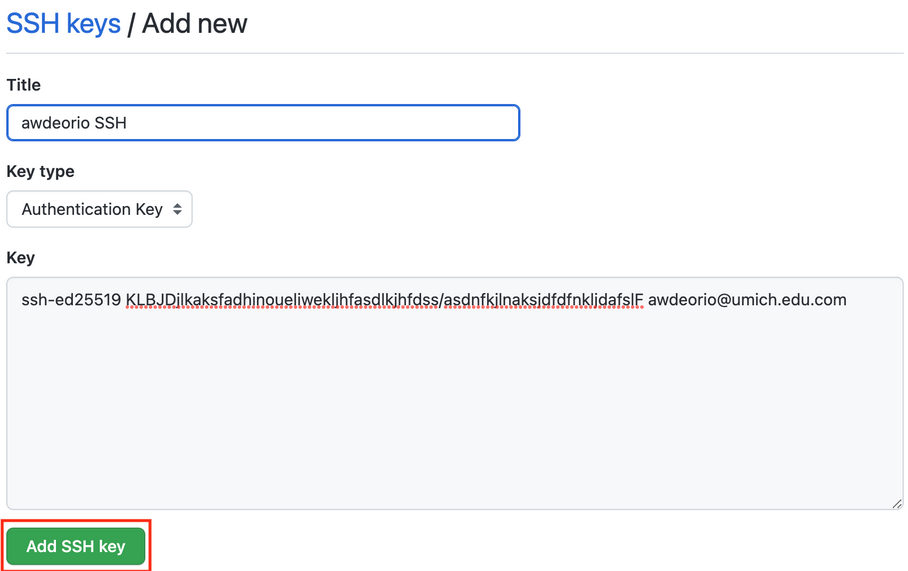
然后就有一个连接到 Github 的 SSH key 了.
WARNING: Do not share your private key with anyone! It’s the file that looks like id_ed25519!
Test your connection:
ssh -T git@github.com
Hi awdeorio! You've successfully authenticated, but GitHub does not provide shell access.
5.1.2 Personal Acces Token
A Personal Access Token is an alternative to SSH Keys.
直接 Login to GitHub. Navigate to Profile > Settings > Developer Settings > Tokens (classic).
直接 Generate 一个,记得 check only the repo box.
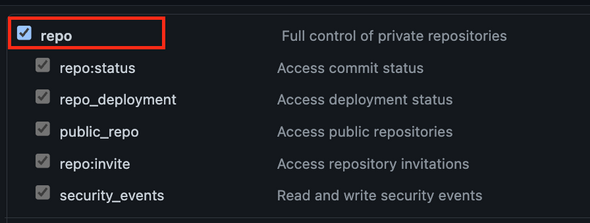
然后 Copy 下来.
5.2 Create a local repository
5.2.1 给 directory 添加一个 .gitignore 文件
这里的这个 .gitignore 是一个 pre-configured 能够 work with most C++ projects 的,因而 280/281 的 pro 都能用.
pwd
# /Users/awdeorio/Developer/eecs280/p2-cv
wget https://eecs280staff.github.io/tutorials/dot_gitignore_sample -O .gitignore
ls -A
# .gitignore
5.2.2 Initialize repo
git init
#Initialized empty Git repository in /Users/awdeorio/Developer/eecs280/p2-cv/.git/
git status
#On branch main

#Untracked files:

#   .gitignore
#    ...

#nothing added to commit but untracked files present (use "git add" to track)
5.2.3 添加 existing files to version control
- 首先 double check 你有一个
.gitignorefile.
shell
   head .gitignore
   # This is a sample .gitignore file that's useful for C++ projects.
- 然后添加包括你的
.gitignore在内的所有文件到 git 中,然后查看 status 就能看到很多待 commit 的 changded files.
shell
   git add .
   git status
   #On branch main
   #
   #Changes to be committed:
   #
   #    new file:   .gitignore
       ...
- Commit 这些文件到 local repo with the commit message “Initial commit”.
shell
   git commit -m "Initial commit"
   #[main (root-commit) cefd222] Initial commit
   # 1 file changed, 71 insertions(+)
   # create mode 100644 .gitignore
- 可以 view commit log and see our first commit.
```shell git log #commit cefd2227510fa5e16e357198be19832b952d314e (HEAD -> main) #Author: Andrew DeOrio awdeorio@umich.edu #Date: Tue Aug 30 19:29:52 2022 -0400
# Initial commit ```
- 然后可以看到the status is clean, 没有什么要 commit 的了.
shell
   git status
   # On branch main
   # nothing to commit, working tree clean
- 你可能不想commit automatically generated or binary files. 因为这些些 Binaries 在别人的 machine 上不一定工作.
shell
   git ls-files
   ...
   # main.exe
   # main.exe.dSYM/Contents/Info.plist
   # main.exe.dSYM/Contents/Resources/DWARF/main.exe
   ...
所以可以把他们从 git 中移除掉,不 commit.
shell
   git rm -f main.exe
   git rm -rf main.exe.dSYM
   git status
   # On branch main
   # Changes to be committed:
   #  (use "git restore --staged <file>..." to unstage)
   #    deleted:    main.exe
   #    deleted:    # main.exe.dSYM/Contents/Info.plist
   #    deleted:    # main.exe.dSYM/Contents/Resources/DWARF/main.exe
   git commit -m "remove binary files"
   git status
   # On branch main
   # nothing to commit, working tree clean
5.3 创建 remote repo 及 connect local reop to remote
创建 remote repo 就是公公又式式的 github 页面上操作一下.
而如何 connect local repo 到 remote:
- 首先确定你在你有 git 的 directory.
shell
   pwd
   # github.com/awdeorio/p2-cv
- 使用这个 address 创建一个 origin
这里非常重要的是,这个 origin 对于使用 SSH 和 Personal Token 的人是不一样的!
For SSH:
shell
   git remote add origin git@github.com:awdeorio/p2-cv.git  # use your URL
For personal Token:
shell
   git remote add origin https://github.com/awdeorio/p2-cv.git  # use your URL
如果写错了那就删除 origin 然后重新写一遍.
shell
   git remote rm origin
- 确认一下已经 connect 上 remote 了
shell
   git remote -v
   # origin git@github.com:awdeorio/p2-cv.git (fetch)
   # origin git@github.com:awdeorio/p2-cv.git (push)
- Your local
gitmay usemasteras the name for the initial branch, whereas GitHub expects it to be named main. 因而用-M指令改名
shell
   git branch
   # master
   git branch -M main
   git branch
   # main
- 把已经 committed 到 local repo 的 commits push 到 remote repo.
shell
   git push -u origin main
- 确认已经 commit, 并 verify commit log.
```shell $ git status # On branch main # Your branch is up to date with 'origin/main'.
# nothing to commit, working tree clean git log # commit cefd2227510fa5e16e357198be19832b952d314e (HEAD -> main) # Author: Andrew DeOrio awdeorio@umich.edu # Date: Tue Aug 30 19:29:52 2022 -0400
# Initial commit ```
5.4 Daily work flow with version control
- 查看 status,检查本地的 branch 是否已经同步更新了 server 的 change,以及本地的 change 是否已经 commit 和 push 到 server.
shell
   git status
- Retrieve any changes from the server.
shell
   git fetch
   git rebase
- Make changes to files.
shell
   git add SOME_FILE
   git commit -m "Short description goes here"
- Push changes to GitHub server.
shell
   git push
5.5 Version Control For a Team
5.5.1 添加 Collaborator
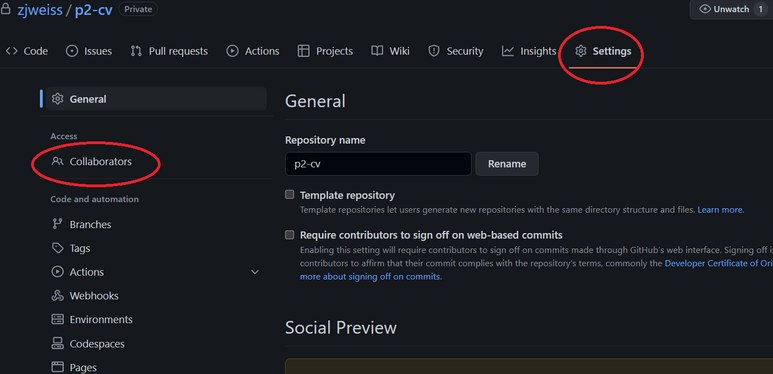
而后:
-
GitHub sends a confirmation email to your partner. Your partner clicks accept.
-
Your partner creates an SSH key or a GitHub Personal Access Token.
-
Your partner
clonethe remote repo on their own local machine using the same remote URL that you do.
shell
   git clone https://github.com/awdeorio/p2-cv.git
5.5.2 解决 Conflict
The following text is copied from a helpful GitHub article.
When you perform a git rebase operation, you’re typically moving commits around. Because of this, you might get into a situation where a merge conflict is introduced. That means that two of your commits modified the same line in the same file, and Git doesn’t know which change to apply.
简单来说就是 merge conflict 发生了. 因为你们都 commit 了,但是你还没有 fetch 对方的 commit 就 commit 了.
这个时候你应该选择 merge 一个 branch. 可以直接在 Github Desktop 进行操作.
git merge BRANCH-NAME
5.5.3 rejected pushes
如果你使用 git push 时 push 被 rejected error 了,那就是你的 teammate made 了一个 commit.
这个时候很简单,先 fetch 再 push.
5.6 注意事项
5.6.1 添加 commit 时的文字备注
比如:
git commit -m "Added README"
git status
commit 一个 change 时应备注来表示做了什么.
5.6.2 README.md 文件
应该在 repo 中添加一个 README.md 文件来写这个 repo 的 instructions and descriptions.
touch README.md
git add README.md
git commit -m "Added README"
git status
5.6.3 看 commit 的内容
git diff 1.cpp
你可以通过 diff 命令查看 the last clean committed version of the file.
5.6.4 删库
首先在 Github 里面删除 repository.
然后删除 .git 这个 hidden file 以及 .gitignore.
pwd
# /Users/awdeorio/Developer/eecs280/p2-cv
rm -rf .git/ .gitignore
ls -A
git status
# fatal: Not a git repository (or any of the parent directories): .git