11 C-style strings
当一个 ptr 出了 arrary 的边界时,我们如果 dereference 就做了一个 undefined behavior,read/write random memory.
因而我们需要 keep pointers in their arrays.
如何做到:
- keep track of the length separately
- put a sentinel value at the end of the array
11.1 C-style strings: 就是末尾自动加上 null \0 的 char array
在 C 中,string 单纯就是一个 char array. 唯一在结构上的特点是,它的末尾被自动加上了一个 null character \0.
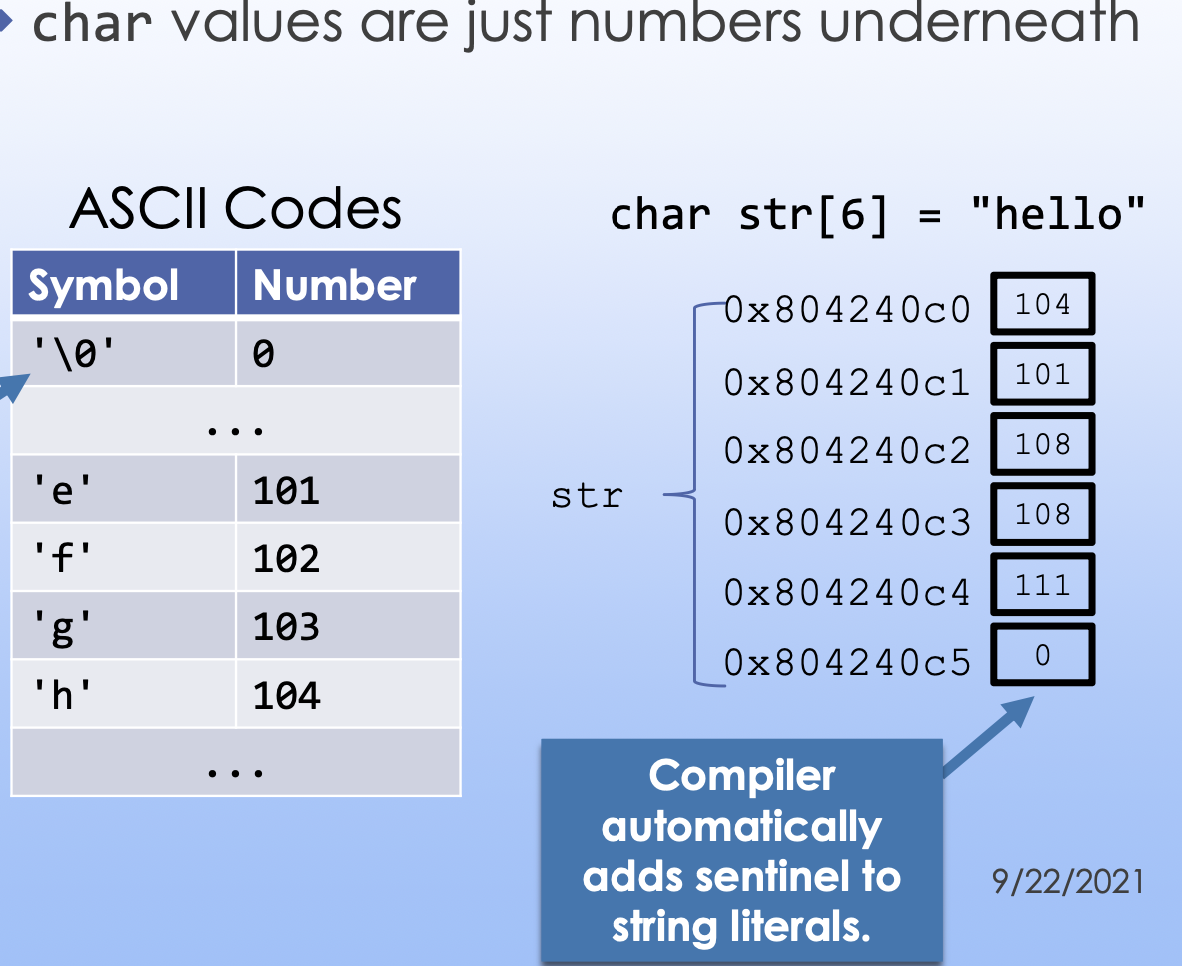
这个 \0 character 并不是数字 0 的 char!!它实际上是 null,它的 ASCII value 为 0.
null character 像一个 sentinel,表示 string 在某个地方停止.
11.1.1 如何 Define 一个 C-style string
如果我们使用 C-style string,以下这两个 definition 是等价的:
char str1[6] = {'h', 'e', 'l', 'l', 'o', '\0'};
char str2[6] = "hello";
注意,如果我们从 "" 形式 initialize,那就是正常的,但是如果我们从 array 形式 initialize,我们必须在最后一个元素后手动加上 '\0'!否则我们 stream out 就会乱七八糟。
char arr[3] = {'a', 'b', 'c'}; cout << arr << endl;
// abcÇ2?╔╠
因为直到找到 '\0' 它才会停止找下去。
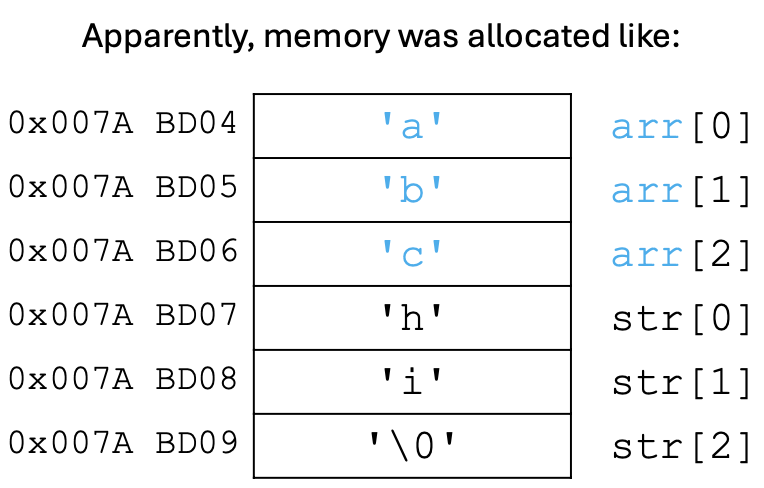
还有一些八股文:如果当我们在同一个 stack 中连续定义两个 c string,并且在上层的不加 sentinal,那么我们就会 stream out 一个连续的合并 string。。。
char str[3] = {'h', 'i', '\0'};
char arr[3] = {'a', 'b', 'c'}; cout << arr << endl;
// abchi
11.1.2 用 pointer 来 initial C-style string: 必须 const
array 意味着:C-style string 是 immutable 的!它的长度不能改变. 而我们熟悉的 C++-style string 则是可以改变大小的.
我们现在要介绍一个勾时的创造一个 C string 的方式:
const char *ptr = "yay";
其实就是
char[] ptr = "yay";
但是这并不是在 stack frame 里面的。我们是在 read only segement 创建了一个没有名字的 C-string 内容为"yay"。但是我们同时定义了一个 pointer to const 叫做 ptr,存储它的首元素地址,那么 ptr 就和数组名有基本相同的作用,相当于模拟了 array 名。我们可以用 ptr[n] 来 slice.
但是通过这个行为我们要强调另外一个事情:
如果我们写
char *ptr = "yay"
这就不对了,因为我们知道 "yay" 作为一个 array ,首元素地址是 const 的,而我们创建了一个非 pointer to const 的 pointer 指向它。
11.1.3 char value 的本质
11.2 cout 由 char array 名字 decay 形成的 char* 会 cout 整个 char array 而不是首元素地址
我们知道,当我们试图获取 array的名字的值时,它就会 decay 成一个对应类型的 pointer.(返回首元素地址)
char str1[6] = "hello";
char *strPtr = str1;
StrPtr 于是就指向了 str1 的第一个元素,也就是 'h'.
ex:
char str1[6] = "hello";
char *strPtr = str1;

char str2[6] = "hello";
char str3[6] = "apple";

cout << (str1 == str2)  // compile 但结果为false, 因为它们都变成了ptr, 这两个值都是地址, 不等

str1 = str3;  // 不 compile, 因为我们尝试获取 str3 的值使其 decay 为一个 ptr, 而左侧是一个 array. Type mismatch.

strPtr = str3;  // 使得 strPtr 重新指向 str3
所以说我们知道:
int arr[3] = {1, 2, 3};
cout << arr << "\n"; // 结果是首元素地址
但是,char array 却是可以这样打印的. 这并不是什么特例,而是因为 <<, >> 对于 char array 类型在 library 中重写过,使其支持这种行为. char array,也就是 C string,有很多 build-in functions.
char str[6] = "hello";
cout << str << endl; // 结果是 hello
这里 str 仍然 decay 成 char* 指针了,并没有什么突变,但是因为 std library 对于 << 的 overload ,cout 把所有 char* 类型都 treat as C-style strings!!
严谨的意思就是说:ostream 型 (比如cout) 只要遇到<< char * 就会持续 write 从该char * 指向的地址往后,直到碰到第一个 null character 之前的所有东西. 通过这样的方式来实现打印整个 C-style string.
11.2.1 warning: 不要打印并非指向一个 C string 的 char* 型变量
然而有一个非常非常逆天的东西,就是这个 overload 不是仅对由 char[] 型 decay 而成的 char * 型变量生效,而是对任何 char * 型变量生效.
也就是说,如果这单纯是一个char * 型变量,而不是一个 char arrary 的名字,是不能直接用 ostream write 的,否则它就会一直 write 该地址后面的所有东西,直到碰到 null character \0 为止. 那这件事情就很危险了,它会一直 write 下去.
**所以 warning: Don’t try to print a char* not pointing into a C-style string. **
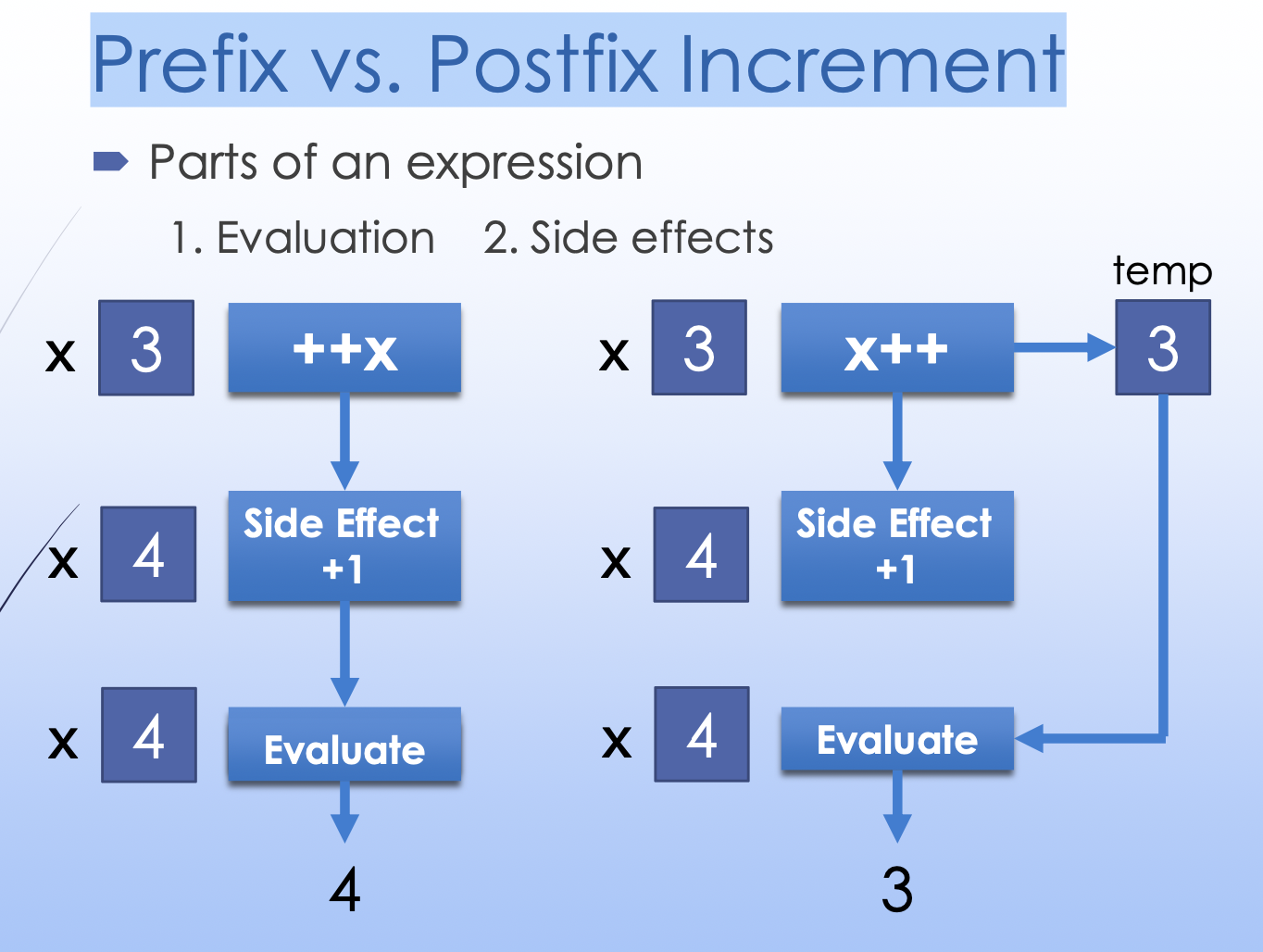
11.3 题外话: Prefix(++x) vs. Postfix(x++) Increment
x += 1 和 ++x 是等价的,因为它们都 increment 了 x,并且 expression 的值都是一样的.
而 x += 1 和 x++ 却不是等价的,它们都 increment 了 x,但是 expression 的值却不一样.
x = 1;
y = 1;

cout << x++;  // 1
cout << ++y;  // 2
例子:
int x = 10;
// go down to 0
while (x --> 0) {
  cout << x << endl;
}
// 9到0, 包含0, 因为x=1时 x--仍是1, 过了判定, 而这行之后就是0了, 于是打印出了0
11.4 C-style strings 的 standard functions
| C-style strings | C++-style strings | |
|---|---|---|
| Library Header | <cstring> |
<string> |
| Declaration | char cstr[]; 或 char *cstr; |
string str; |
| 获取 Length | strlen(cstr) |
str.length() |
| Copy value | strcpy(cstr1, cstr2) |
str1 = str2 |
| Indexing | cstr[i] |
str[i] |
| Concatenate | strcat(cstr1, cstr2) |
str1 += str2 |
| Compare | strcmp(cstr1, cstr2) |
str1 == str2 |
11.4.1 Implementation of strcpy
strcpy 的作用是把第二个 cstr 的值传给第一个.
char str1[6] = "hello";
char str2[6] = "apple";
strcpy(str1, str2); // str1 的值要变成 "apple"
我们这样写:
void strcpy(char *dst, const char *src) { // 这是个 ptr-to-const 而不是 const ptr, 可以更改指向的对象, 但是不能用它解引用更改指向对象的值; char * const src 则是 const ptr, 能用它解引用更改指向对象的值, 但是不能更改指向的对象,
    while (*src != '\0') {
    *dst = *src;
    ++src;
    ++dst;
  }
  *dst = *src;  // 最后 copy null char
}
还有一个极端简短的版本:
void strcpy(char *dst, const char *src) {
    while (*dst++ = *src++) {}
}
11.4.2 C++ string 和 C string 的相互转换
- 把 C++ string 转成 C string:
c++
   const char *cstr = str.c_str();
- 把 C string 转成 C++ string:
c++
   string str = string(cstr);
11.4.3 strcmp(A, B)
strcmp(A,B) returns:
- if A 比 B 小(字母ascii), 返回一个负值表示小多少(一个int)
- If A = B, 返回 0
- if A 比 B 大(字母ascii), 返回一个正值表示大多少(一个int)
返回的是第一个不一样的字母的 ascii 码的大小差距.
11.5 Command Line Arguments
11.5.1 int main(int argc, char *argv[]) 的结构
main() 函数是可以传 parameters 的. 我们可以在 terminal (或者VSCode 的 launch.json 代替 terminal) 给 program 指定 arguments.
./redact bee bee.txt out.txt 10
比如这个 command line. 其中有 5 个 arguments: ./redact, bee, bee.txt, out.txt, 10.
注意程序名本身也是一个 command line argument.
为了接收 arguments,我们的 main() 的括号里要写东西:
int main(int argc, char *argv[]) {
    ...
}
这里的 argc 是一个表示 arguments 的数量的 int ,而 argv 是一个 array,其元素的类型都是 char *.
具体传参数的方式如下:
我们 command line arguments ,除了程序名自身是用来 start program 的,**之后的几个 arguments (一个 arrary) 会被做成一个 array,其每个元素都是一个 c-string,也就是一个 char array. **
这个大 array 里面每个小 char array 的地址,都会传给 main() 的 parameter argv。
argv 是一个元素为 char * 的 array 型参数,我们知道函数传进去 array 参数并不是真的 array 而是会彻底变成一个指向首元素的 pointer 。compiler 会把它自动变成 char **argv。
**但是这完全不影响它的作用。argv[] 的值就是第 0 个 argument 这个 c string 的首个 char 的地址。我们可以使用 [] 符号来解引用 *(argv + i),表示第 i 个 argument 这个 c string 的首个 char 的地址。 **
而我们知道,**所有 stream 对于 char * 型变量,也就是 char 的地址,会直接 in/write 它所表示的 char 以及之后的 char 一直到碰到 \0 为止。所以当我们 cout << argv[1]的时候, argv[1] 是一个地址,但是我们 cout 的是一整个 argument. **
结构如下:

fstream 也一样。
int main(int argc, char *argv[]) {
  if (argc != 5) {
    cout << "Usage: ./redact WORD INFILE OUTFILE NUM_STARS" << endl; return 1;
  }

  string wordToRemove = argv[1];

  ifstream fin(argv[2]);
  ofstream fout(argv[3]);
}
我们通过一个题目来检测一下理解:
// ./program cat dog lobster
int main(int argc, char *argv[]) {
  cout << argc  // 4
  cout << argv[1] // cat
  cout << *argv[1] // *(argument1的首个char的address) = argument1的首个char = c
  cout << argv[2] + 1 << " "; // argument2的首个元素address + 1 = argument2的首个元素address + 1个char大小的address = argument2的次元素address, 经过stream out打印出argument2从次元素开始的部分cstring = og
}
// 4 cat c og
11.5.1 如何把 command line arguments 里面的数字 c-string 转为 double
我们已经知道了,每个 arguments 是一个 c-string.
实际上我们有些 arguments 的意思是 int, double. 但是在 command line 里只能打出 string.
那么我们怎么把它们转化成 int/double 呢?
- 如果想要转化成 C++-style string:
<string> 这个 library 里有两个函数: stoi() 和 stod().
(1) stoi() parses an integer encoded in a string.
(2) stod() parses a double encoded in a string.
- 如果想要转化成 C-style string:
需要 #include <cstdlib>
对应的是 atoi(), atof()
#include <string> // needed for stoi() or stod() using namespace std;
int main(int argc, char *argv[]) {
  // parse string "10" to int 10
  int numStars = stoi(argv[4]);
  // e.g. numStars is 3, makes ***
  string replacement(numStars, '*');
}
使用例:Add up command line arguments.
./sum 1 2 3 4 5
int main(int argc, char *argv[]) {
  int sum = 0;
  for (int i = 1; i < argc; ++i) {
    sum += atoi(argv[i]);
  }
  cout << "sum is " << sum << endl;
}
12.6.2 Caution when comparing elements of argv
int main(int argc, char *argv[]) {
  // BAD, compares addresses
    if (argv[1] == "--debug") { ... }

  // OK, wrap one in a std::string
  if (std::string(argv[1]) == "--debug") { ... }

  // OK, ""s suffix creates a std::string
    if (argv[1] == "--debug"s) { ... }

  // BAD, compares addresses
  if (argv[1] == argv[2]) { ... }

  // OK, wrap one in a std::string
    if (std::string(argv[1]) == argv[2]) { ... }
}
12.6.3 综合使用例
int main(int argc, char *argv[]) {
  if (argc != 3) {
    cout << "Usage: redact INFILE OUTFILE" << endl; return 1;
  }
    string inName = argv[1]; string outName = argv[2];
    cout << "Copying from " << inName << " to " << outName << endl;
    string wordToRemove;
    cout << "What word would you like to remove? "; cin >> wordToRemove;
  ifstream fin(inName);
  ofstream fout(outName);
  if ( !fin.is_open() || !fout.is_open() ) {
    cout << "Unable to open one of the files!" << endl; return 1;
    }

    string word;
  while (fin >> word) {
        if (word != wordToRemove) { fout << word << " "; }
    }
  fin.close(); fout.close();
}